

If you or someone you know is in crisis, help is available right now. You can also find a virtual GA meeting — available 24/7, no signup required.
Emergency
Gambling Help
How To Block Gambling & Casino Ads
Most social media platforms let you hide gambling ads — it just takes a few taps. Here's how to do it on every major platform.
Facebook & Instagram (Meta)
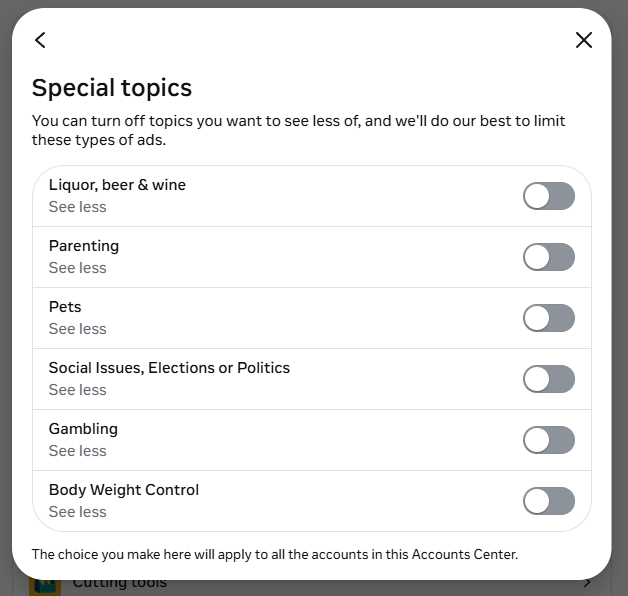
Step 1 — Turn off Gambling in Special Topics
- Open the Facebook or Instagram app → ☰ → Settings and privacy → Settings
- Tap Accounts Center → Ad preferences
- Tap Ad topics → Special topics
- Find Gambling and toggle it to "See less"
Step 2 — Block gambling keywords
- From the same Ad topics page, use the search bar at the top
- Type gambling-related keywords one at a time and mark each as "See Less":
Suggested keywords: Gambling, Casino, Slots, Jackpot, Roulette, Blackjack, Sports Betting, Poker, Lottery, Sportsbook, DraftKings, FanDuel, BetMGM, Bet365
Tip: These settings apply to both Facebook and Instagram since they share Meta's Accounts Center. One set of changes covers both platforms.
Step 3 — Remove gambling shortcuts from your sidebar
- On desktop Facebook, look for the "Your shortcuts" panel in the left sidebar (where slot/casino apps tend to live).
- Hover over each gambling shortcut (Caesars Slots, Cashman Casino, etc.). A small edit icon or X will appear on the right side of the row.
- Click it and choose "Remove from shortcuts" or "Hide".
- If the icon doesn't show, click the three-dot menu next to "Your shortcuts" → Edit shortcuts → uncheck the ones you want gone.
Step 4 — Disconnect old gambling apps from your account
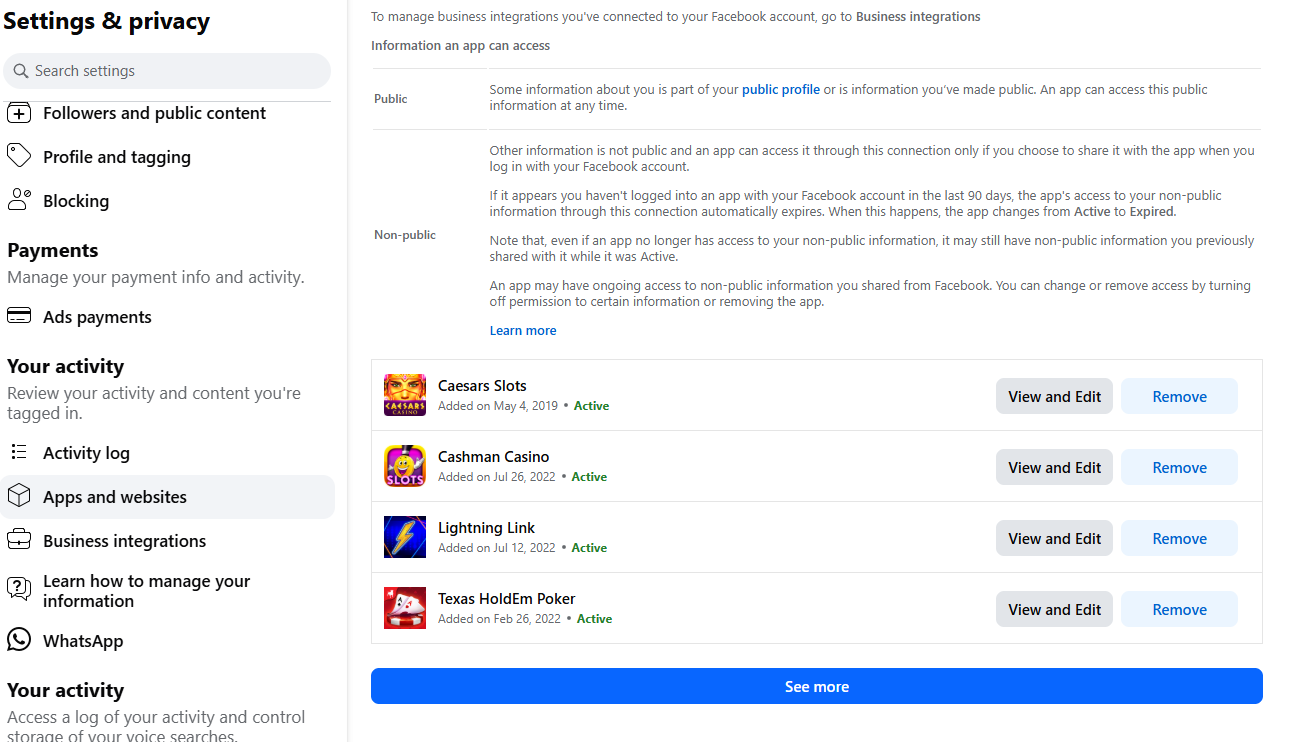
This is the highest-impact step. Every gambling app you've ever used "Login with Facebook" for is still linked, feeding the algorithm and potentially letting them re-target you.
- Go to Settings & privacy → Settings → Apps and websites (left sidebar).
- You'll see every app you've ever logged into with Facebook. Check both the Active and Expired tabs.
- Click Remove on every gambling app, sportsbook, casino, slot game, or poker app you find.
Step 5 — Unlike and unfollow gambling pages
- Go to your Profile → More → Likes (sometimes shown under "About").
- Scroll through and unlike any gambling-related pages.
- Open Activity Log → Following and unfollow any gambling-related pages, people, or sportsbook accounts you're following.
If the algorithm is genuinely a trigger, the strongest move is a fresh Facebook account — or stepping away from Facebook entirely while you build your recovery. Cleaning targeting helps, but Meta's ad system is persistent and gambling advertisers re-target lookalike audiences constantly. There's no shame in choosing the cleaner break.
- Go to Settings → Privacy (or visit your account settings on reddit.com)
- Scroll to "Limit ads in selected categories"
- Toggle "Allow gambling ads" to off
- Tap Done
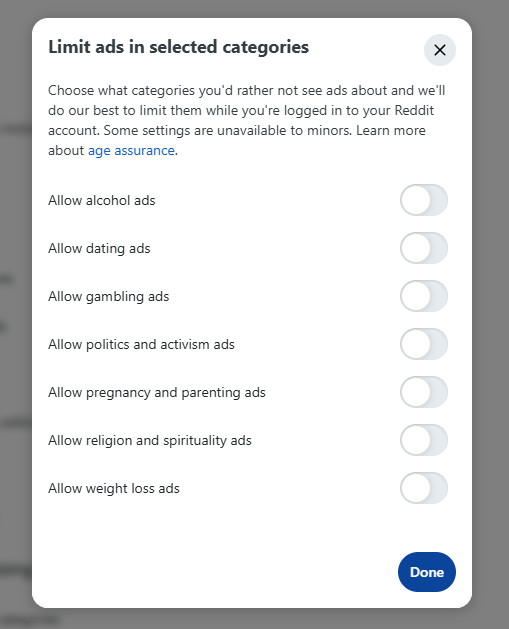
Tip: While you're there, you can also disable alcohol, dating, and other ad categories you'd rather not see.
YouTube & Google (Search, Gmail)
- Go to myadcenter.google.com and sign in
- Look for "Sensitive topics" (sometimes listed under "Limit ads")
- Find Gambling and turn it off
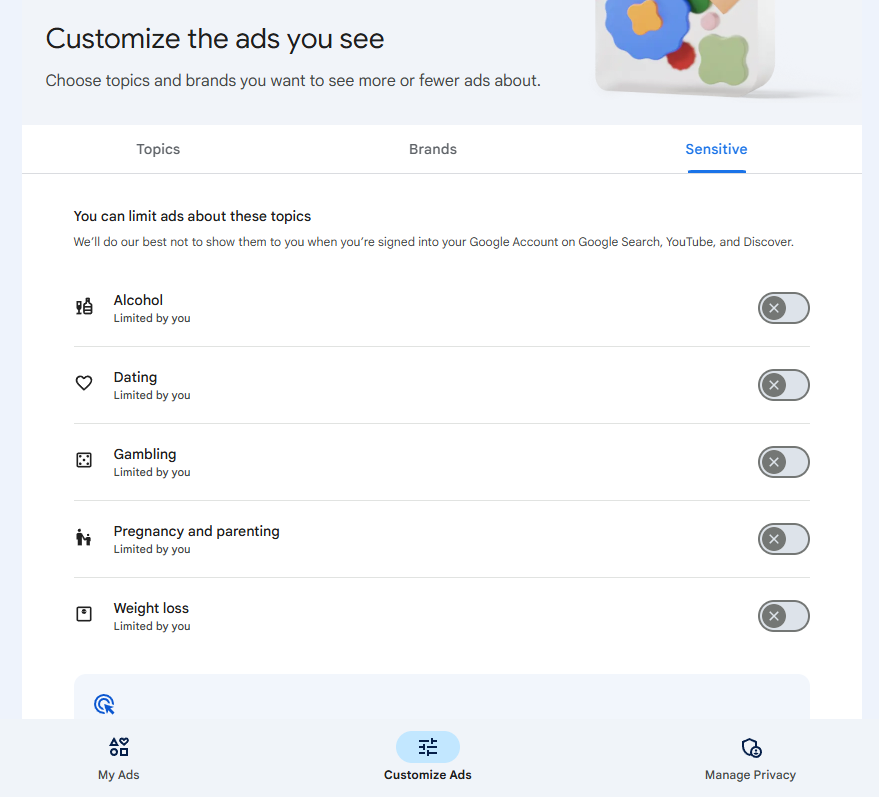
Tip: This one setting covers YouTube, Google Search, Gmail, Discover, and any website running Google ads — which is most of the web.
TikTok
- When a gambling ad appears, long press on the video
- Tap "Not interested"
- For more control: go to Profile → ☰ Menu → Settings and privacy
- Tap Ads → "Advertiser settings"
- Turn off "Personalized ads" to reduce targeting based on your activity
Tip: TikTok also lets you report ads. Tap "Report" and select that the ad is for gambling content — this helps TikTok filter future ads for you.
X (Twitter)
- When you see a gambling ad, tap the ⋯ on the ad
- Select "This ad isn't relevant to me"
- For broader control: go to Settings → Privacy and Safety → Ads preferences
- Turn off "Personalized ads"
- Under "Your advertiser list", you can also block specific gambling advertisers
Tip: Blocking individual gambling company accounts (like DraftKings, FanDuel, etc.) also prevents their promoted posts from showing up.
Snapchat
- Tap your profile icon → ⚙ Settings
- Scroll to Ad Preferences (under Privacy Controls)
- Turn off "Activity-based Audiences" and "Third-party Ad Networks"
- When gambling ads appear in Stories or Discover, hold on the ad and select "I don't want to see this"
Tip: Snapchat doesn't have topic-level blocking, so hiding individual ads and turning off personalization is the best approach.